ATS stands for applicant tracking system. It is the recruitment software an employer uses to collect job applications, read each resume into a structured database, and let recruiters search and rank the people who applied.
It is a filing cabinet with a search engine attached — not a robot that decides who gets hired. Understanding that difference is most of what you need.
If you've applied for a job in the last decade, someone has probably warned you about "the ATS" — usually in the same breath as a story about a perfectly qualified person whose resume vanished into a void, never seen by a human. The warning isn't wrong that ATS software matters. It's wrong about how, and about how much power the software actually has.
An applicant tracking system is, at its core, a database with a search engine attached. Companies use it to collect applications, store them in one place, and give recruiters a way to sort through volume that would be unmanageable by hand. What it does technically is more mundane — and more useful to understand — than the horror stories suggest.
What an ATS actually does when you hit submit
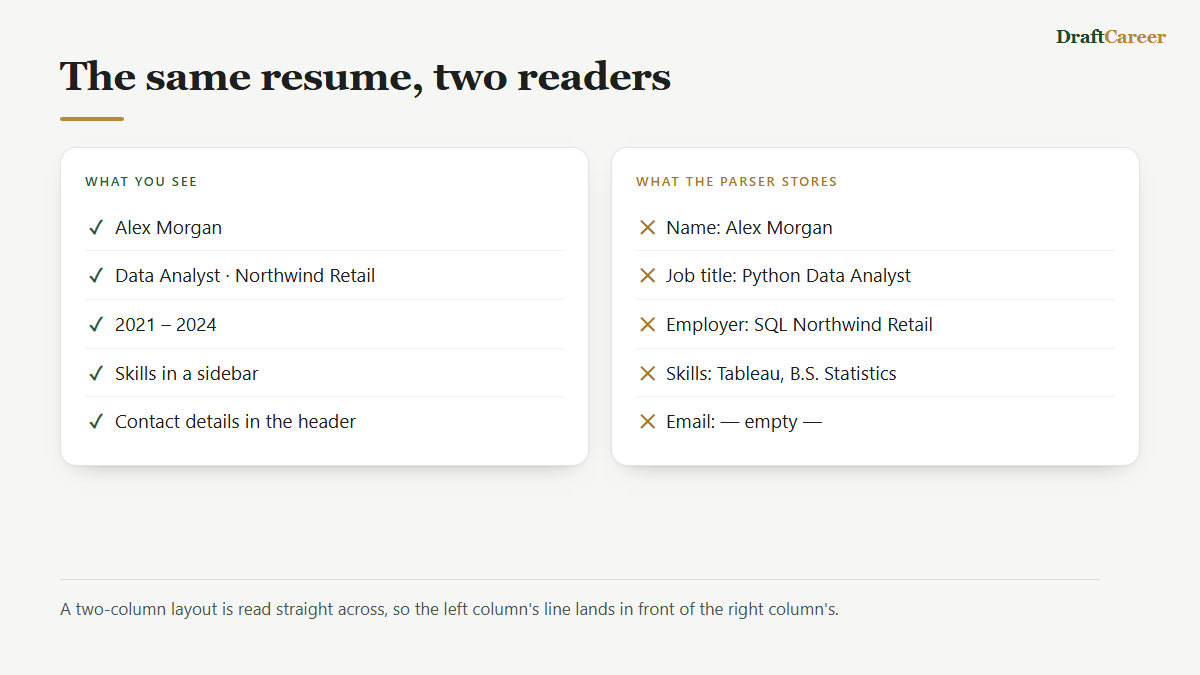
When you upload a resume, the ATS doesn't just file it away as a PDF. It runs the document through a parser that tries to convert your resume into structured data: your name, contact details, employers, job titles, dates, and skills, each dropped into its own field in a database record. Most systems lean on some form of named-entity recognition to do this — software trained to recognize that "Microsoft" is a company, "2021–2024" is a date range, and "Project Manager" is a job title, rather than just treating your resume as an undifferentiated block of text.
That structured record is what the recruiter actually interacts with. When they open the ATS and search for candidates, they're querying those fields — filtering by years of experience, searching for a specific certification, or pulling up everyone whose parsed skills list includes a particular tool. If your resume doesn't parse cleanly, the problem usually isn't rejection — it's that your information lands in the wrong field, or in no field at all, so it doesn't show up when a recruiter searches for it.
Keyword matching and ranking, not a pass/fail gate
The second job an ATS does is compare your parsed resume against a job requisition — the enterprise platforms doing this are recruiting suites like Greenhouse, Workday and Oracle Recruiting and produce some kind of match score or ranking. Older systems did this crudely, counting how many times exact keywords from the job posting appeared in your resume. Newer systems increasingly use natural language processing that can recognize related concepts even when the wording doesn't match exactly — so "managed a team of engineers" and "led a cross-functional group" might both register as leadership experience, not just literal keyword hits.
What that ranking produces is a sorted list, not a locked door. The system surfaces candidates it thinks are strong matches near the top and pushes weaker matches further down — but in the large majority of hiring workflows, a recruiter still opens that list and looks through it, especially past the first handful of names. The ATS is doing triage, not making the hiring decision.
The myth: "no human ever sees most resumes"
This is where a lot of job-search advice overcorrects. The claim that circulates most widely — that a fixed, huge percentage of resumes get auto-rejected by ATS software before any person looks at them — turns out to be much shakier than its ubiquity suggests. Tracing the claim back tends to lead to a marketing pitch from a small resume-optimization vendor over a decade ago, not to any published study or methodology. It's the kind of number that gets repeated because it's alarming and specific, not because anyone verified it.
When researchers and industry writers have actually gone and asked recruiters about it, the picture looks different. Surveys of working recruiters have found that the large majority say their ATS does not automatically discard applications based on formatting, design, or keyword count alone — they're the ones making the call, using the system's ranking as a starting point rather than a verdict. Separately, Harvard Business School's Hidden Workers research found that keyword-based screening is common at large employers, but described it as a filtering and prioritization step that human recruiters still operate, not a fully automated rejection pipeline running unsupervised.
None of that means ATS software is harmless to ignore. It means the honest version of the warning is narrower: getting parsed badly can bury you lower in a ranked list or send your information to the wrong field, which lowers your odds of getting noticed. It's a real disadvantage, not a guaranteed, invisible auto-reject.
There is one place automatic rejection genuinely happens: knockout questions. Many application flows include a handful of screening questions set up by the employer — "Are you authorized to work in this country?" or "Do you have an active nursing license?" — and an automatic "no" on one of those can end an application without human review. That's a real, human-configured filter. It's just a different, much narrower thing than the resume itself being silently discarded by an algorithm.
Myth and reality, side by side
Most of the fear around these systems comes from four claims. Here is what each one gets right and where it goes wrong.
| What you hear | What actually happens |
|---|---|
| "75% of resumes are auto-rejected" | The number traces back to a vendor's marketing, not a study. Recruiters overwhelmingly say their system doesn't discard applications on its own. |
| "A robot decides whether you get an interview" | The system ranks and sorts. A recruiter opens the list and chooses, using the ranking as a starting point. |
| "Nothing is ever rejected automatically" | Knockout questions genuinely are automatic — work authorisation, a required license — but those are employer-set questions, not your resume's formatting. |
| "Formatting doesn't matter, only content does" | Parsing failures are real and common. They don't reject you; they file your details in the wrong place, so you never surface in a search. |
What actually trips up parsing
Even though ATS software isn't the ruthless gatekeeper of legend, poor parsing is a real, well-documented problem, and it's worth taking seriously because it's entirely within your control. Parsers generally read a document the way a person skimming quickly would: left to right, top to bottom, working through the main body of text. Anything that breaks that simple flow tends to cause trouble.
- Multi-column layouts and tables — a parser reading left-to-right can merge a job title from the left column with a skill from the right column into one garbled line, or skip a column's contents entirely.
- Text boxes and inserted graphics — content placed in a floating text box or a design element often sits outside the document's main text stream, and some parsers never read it at all.
- Headers and footers — contact information tucked into a document header can be missed if the parser only processes the body.
- Images, icons, and logos — a parser reads text, not pictures, so a skill represented only as an icon effectively doesn't exist to the system.
- Unusual fonts and characters — decorative fonts and special glyphs can be misread as odd symbols or dropped, especially when a file gets converted between formats.
Want to see your own resume the way a parser does?
DraftCareer's free ATS checker reads your file and shows which details it could and couldn't pick up — no account needed. Our full ATS formatting guide covers the fixes.
The practical fix is almost always the same: a single-column layout, standard section headings, contact information in the body rather than the header, and a widely supported font. None of this requires making your resume look plain or generic — it just means keeping the underlying structure simple enough for software to read correctly, on top of whatever visual design you choose.
The takeaway
An ATS is a filing and ranking tool, not a judge. It converts your resume into structured data, scores or sorts that data against a job's requirements, and hands the result to a recruiter who still does the actual choosing in the overwhelming majority of cases. Worry less about a mythical auto-reject switch, and more about whether your resume's structure lets the system read you correctly in the first place — that's the part actually within your control. If you want a quick check on that front, DraftCareer's free ATS compatibility checker scans your resume for the formatting issues described above before you send it anywhere.